Sunday, October 7, 2012

SOAP Faults

A SOAP message that contains a Fault element in the Body is called a fault message. When a fault message is generated, the Body of the SOAP message must contain only a single Fault element and nothing else. The Fault element itself must contain a faultcode element and a faultstring element, and optionally faultactor and detail elements.


<?xml version="1.0" encoding="UTF-8"?>
<soap:Envelope
 xmlns:soap="http://schemas.xmlsoap.org/soap/envelope/"
 xmlns:mh="http://www.Monson-Haefel.com/jwsbook/BookQuote" >
  <soap:Body>
    <soap:Fault>
      <faultcode>soap:Client</faultcode>
      <faultstring>
        The ISBN value contains invalid characters
      </faultstring>
      <faultactor>http://www.xyzcorp.com</faultactor>
      <detail>
        <mh:InvalidIsbnFaultDetail>
          <offending-value>19318224-D</offending-value>
          <conformance-rules>
            The first nine characters must be digits. The last
            character may be a digit or the letter 'X'. Case is
            not important.
          </conformance-rules>
        </mh:InvalidIsbnFaultDetail>
      </detail>
    </soap:Fault>
  </soap:Body>
</soap:Envelope>


The faultcode element may use any of four standard SOAP fault codes to identify an error.
SOAP Standard Fault Codes

1.       Client - node that sent the SOAP message caused the error. receiver cannot process the SOAP message because there is something wrong with the message or its data, it's considered the fault of the client, the sender
When a node receives a fault message with a Client code, it should not attempt to resend the same message. It should take some action to correct the problem or abort completely.

2.       Server - the node that received the SOAP message malfunctioned or was otherwise unable to process the SOAP message.
In this case the sender can assume the SOAP message to be correct, and can redeliver it after pausing some period of time to give the receiver time to recover

3.       VersionMismatch - a SOAP 1.1 node will generate a fault with a VersionMismatch code if it receives a SOAP 1.2 message, because it finds an unexpected namespace in the Envelope.
The VersionMismatch fault applies only to the namespace assigned to the Envelope, Header, Body, and Fault elements. It does not apply to other parts of the SOAP message, like the header blocks, XML document version, or application-specific elements in the Body.
The VersionMismatch fault is also used in the unlikely event that the root element of a message is not Envelope, but something else. Sending a VersionMismatch fault message back to the sender in this case may not be helpful, however: The sender may be designed to handle a different protocol and doesn't understand SOAP faults.

4.       MustUnderstand

Although you're allowed to use arbitrary fault codes, you should use only the four standard codes listed.
The faultstring element is mandatory. It should provide a human-readable description of the fault. 

Although the faultstring element is required, the text used to describe the fault is not standardized
Optionally, the faultstring element can indicate the language of the text message using a special attribute, xml:lang.

The faultactor element indicates which node encountered the error and generated the fault (the faulting node). This element is required if the faulting node is an intermediary, but optional if it's the ultimate receiver.

The detail element of a fault message must be included if the fault was caused by the contents of the Body element, but it must not be included if the error occurred while processing a header block.

The detail element may contain any number of application-specific elements, which may be qualified or unqualified, according to their XML schema. In addition, the detail element itself may contain any number of qualified attributes, as long as they do not belong to the SOAP 1.1 namespace, "http://schemas.xmlsoap.org/soap/envelope".

Summary on Faults
This is probably a good time to recap. Faults result from one of several conditions:
  1. The message received by the receiver is improperly structured or contains invalid data.
  2. The incoming message is properly structured, but it uses elements and namespaces in the Body element that the receiver doesn't recognize.
  3. The incoming message contains a mandatory header block that the receiver doesn't recognize.
  4. The incoming message specifies an XML namespace for the SOAP Envelope and its children (Body, Fault, Header) that is not the SOAP 1.1 namespace.
  5. The SOAP receiver has encountered an abnormal condition that prevents it from processing an otherwise valid SOAP message.
The first two conditions generate what are considered Client faults, faults that relate to the contents of the message: The client has sent an invalid or unfamiliar SOAP message to the receiver. The third condition results in a MustUnderstand fault, and the fourth results in a VersionMismatch fault. The fifth condition is considered a Server fault, which means the error was unrelated to the contents of the SOAP message. A server fault is generated when the receiver cannot process a SOAP message because of an abnormal condition.

SOAP : More Details

Scenario
Consider a scenario in which SOAP message goes from sender to receiver via many intermediaries 


Intermediaries in a SOAP message path must not modify the application-specific contents of the SOAP Body element, but they may, and often do, manipulate the SOAP header blocks.


two relatively simple header blocks: message-id and processed-by. The processed-by header block keeps a record of the SOAP applications (nodes) that process a SOAP message on its way from the initial sender to the ultimate receiver. Like the message-id header, the processed-by header block is useful in debugging and logging

<?xml version="1.0" encoding="UTF-8"?>
<soap:Envelope
 xmlns:soap="http://schemas.xmlsoap.org/soap/envelope/"
 xmlns:mi="http://www.Monson-Haefel.com/jwsbook/message-id"
 xmlns:proc="http://www.Monson-Haefel.com/jwsbook/processed-by">
  <soap:Header>
    <mi:message-id>11d1def534ea:b1c5fa:f3bfb4dcd7:-8000</mi:message-id>
    <proc:processed-by>
      <node>
        <time-in-millis>1013694680000</time-in-millis>
        <identity>http://www.customer.com</identity>
      </node>
      <node>
        <time-in-millis>1013694680010</time-in-millis>
        <identity>http://www.Monson-Haefel.com/sales</identity>
      </node>
      <node>
        <time-in-millis>1013694680020</time-in-millis>
        <identity>http://www.Monson-Haefel.com/AR</identity>
      </node>
      <node>
        <time-in-millis>1013694680030</time-in-millis>
        <identity>http://www.Monson-Haefel.com/inventory</identity>
      </node>
      <node>
        <time-in-millis>1013694680040</time-in-millis>
        <identity>http://www.Monson-Haefel.com/shipping</identity>
      </node>
    </proc:processed-by>
  </soap:Header>
  <soap:Body>
      <!-- Application-specific data goes here -->
  </soap:Body>
</soap:Envelope>

actor attribute
You use an actor attribute to identify a function to be performed by a particular node.

Just as a person can perform one or more roles in a stage play, a node can play one or more roles in a SOAP message path. Unfortunately, the designers of SOAP 1.1 confused the words "actor" and "role"; they specified that you must identify the roles a node will play by declaring an actor attribute. They've recognized their mistake, and in SOAP 1.2 this attribute has been renamed role.

The actor attribute is used in combination with the XML namespaces to determine which code module will process a particular header block. Conceptually, the receiving node will first determine whether it plays the role designated by the actor attribute, and then choose the correct code module to process the header block, based on the XML namespace of the header block. Therefore, the receiving node must recognize the role designated by the actor attribute assigned to a header block, as well as the XML namespace associated with the header block


<?xml version="1.0" encoding="UTF-8"?>
<soap:Envelope
 xmlns:soap="http://schemas.xmlsoap.org/soap/envelope/"
 xmlns:mi="http://www.Monson-Haefel.com/jwsbook/message-id"
 xmlns:proc="http://www.Monson-Haefel.com/jwsbook/processed-by">
  <soap:Header>
    <mi:message-id soap:actor="http://www.Monson-Haefel.com/logger" >
      11d1def534ea:b1c5fa:f3bfb4dcd7:-8000
    </mi:message-id>
    <proc:processed-by>
      <node>
        <time-in-millis>1013694680000</time-in-millis>
        <identity>http://www.customer.com</identity>
      </node>
    </proc:processed-by>
  </soap:Header>
  <soap:Body>
      <!-- Application-specific data goes here -->
  </soap:Body>
</soap:Envelope>

Only those nodes in the message path that identify themselves with the actor value "http://www.Monson-Haefel.com/logger" will process the message-id header block; all other nodes will ignore it

The actor attribute may have values like
  1. 1.       custom URIs like "http://www.Monson-Haefel.com/logger",
  2. 2.       two standard roles for the actor attribute: next
  3. 3.       and ultimate receiver.

The next role indicates that the next node in the message path must process the header. The next role has a designated URI, which must be used as the value of the actor attribute: "http://schemas.xmlsoap.org/soap/actor/next".

The ultimate receiver role indicates that only the ultimate receiver of the message should process the header block. The protocol doesn't specify an explicit URI for this purpose; it's the absence of an actor attribute in the header block that signals that the role is ultimate receiver

must understand attribute

In many cases we may not know the exact message path or the capabilities of all the nodes in a message path, which means we don't always know whether nodes can process header blocks correctly.  For example, the processed-by header block is targeted at the next role, which means the next node to receive it should process it. But what if the next node doesn't recognize that kind of header block?

The mustUnderstand attribute can have the value of either "1" or "0", to represent true and false, respectively. 0 is default.

The "understand" in mustUnderstand means that the node must recognize the header block by its XML structure and namespace, and know how to process it.

If a node doesn't understand a mandatory header block, it must generate a SOAP fault (similar to a remote exception in Java) and discard the message; it must not forward the message to the next node in the message path

Whether or not a fault is sent back to the sender depends on whether the messaging exchange pattern (MEP) is One-Way or Request/Response.

If the mustUnderstand attribute is "0", the processing requirements specified by SOAP are very different. If a node performs the role declared by a non-mandatory header block, and an application fails to understand the header (it doesn't recognize the XML structure or the namespace), it must remove the header block.
In other words, receivers should not attempt to determine whether a message was successfully processed by previous nodes in the path based on which header blocks are present

Note :- header element is optional but body is mandatory.

Neither SOAP 1.1 nor the BP explicitly prohibits intermediaries from modifying the contents of the Body element. As a result, the ultimate receiver has no way of knowing if the application-specific data has changed somewhere along the message path. SOAP 1.2 reduces this uncertainty by explicitly prohibiting certain intermediaries, called forwarding intermediaries, from changing the contents of the Body element and recommending that all other intermediaries, called active intermediaries, use a header block to document any changes to the Body element.


ok

SOAP Basics


It has a clear purpose exchanging data over network ( via protocols like http , ftp , smtp etc ).


< ? xml version="1.0" encoding="UTF-8"? >
< soap : Envelope xmlns:soap="http://schemas.xmlsoap.org/soap/envelope/">
  < soap:Header >
    < !- - Header blocks go here - - >
  < / soap:Header >
  < soap:Body >
    < !- - Application data goes here - - >
  < / soap:Body >
< / soap:Envelope >

The Header element can contain XML elements that describe security credentials, transaction IDs, routing instructions, debugging information, payment tokens, or any other information about the message that is important in processing the data in the Body element.

< ? xml version="1.0" encoding="UTF-8"? >
< soap : Envelope
 xmlns : soap="http://schemas.xmlsoap.org/soap/envelope/" >
  < soap : Body>
    < po : purchaseOrder orderDate="2003-09-22"
     xmlns : po=" http://www.Monson-Haefel.com/jwsbook/PO ">
      < po : accountName > Amazon.com< / po:accountName >
      < / po:purchaseOrder >
   </ soap : Body>
</ soap : Envelope >

Use of a name space 
1. basic thing like avoid collision
2. proper versioning
3. hence proper processing
4. As you can see from the previous examples, a SOAP message may contain many different namespaces, which makes SOAP messaging very modular. This modularity enables different parts of a SOAP message to be processed independently of other parts and to evolve separately.
5. Example :- The code that processes the element Envelope is independent of the code that processes the header blocks, which is independent of the code that processes application-specific data in the SOAP Body element

SOAP can be used with a variety of messaging systems (asynchronous, synchronous, RPC, One-Way, and others),


SOAP Over HTTP
It's possible to deliver SOAP messages using other protocols, such as SMTP and FTP as well, but details of these non-HTTP bindings are not specified by SOAP and are not supported by the BP
SOAP messages sent over HTTP are placed in the payload of an HTTP request or response.
There is nothing intrinsic to HTTP that limits it to requesting Web pages, but that's been its primary occupation for the past decade. Most HTTP traffic is composed of HTTP GET requests and HTTP replies. The HTTP GET request identifies the Web page requested and may include some parameters. An HTTP reply message returns the Web page to the requester as its payload.
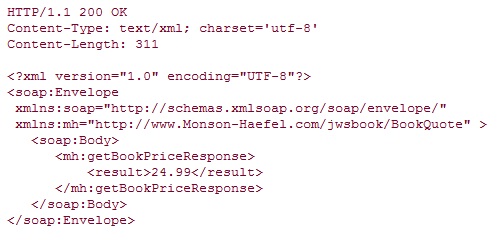
While the HTTP GET request is perfectly suited for requesting Web pages, it doesn't have a payload area and therefore cannot be used to carry SOAP messages. The HTTP POST request, on the other hand, does have a payload area and is perfectly suited to carrying a SOAP message. HTTP reply messages, whether they are replies to GET or POST messages, follow the same format and carry a payload. Web services that use SOAP 1.1 with HTTP always use HTTP POST and not HTTP GET messages.


The HTTP POST message must contain a SOAPAction header field, but the value of this header field is not specified. The SOAPAction header field can improve throughput by providing routing information outside the SOAP payload. A node can then do some of the routing work using the SOAPAction, rather than having to parse the SOAP XML payload.

While the SOAPAction header field can improve efficiency, it's also the source of a lot of debate in the Web services industry. SOAP purists don't like the use of the SOAPAction HTTP header field because it expands the SOAP processing model to include the carrier protocol (in this case HTTP). They believe that all of the routing and payload should be contained in the SOAP document, so that SOAP messages are not dependent on the protocol over which they are delivered.

SOAP 1.2 will replace the SOAPAction header with the protocol-independent action media type (a parameter to the "application/soap+xml" MIME type), so dependency on this feature may result in forward-compatibility problems.

You may have noticed that the Content-Type is text/xml, which indicates that the payload is an XML document. The WS-I Basic Profile 1.0 prefers that the text/xml Content-Type be used with SOAP over HTTP. It's possible to use others (for example, SOAP with Attachments would specify multipart/related) but it's not recommended.

Http Reply


Http Response Code : Success code
200 : ok
202 : Accepted This response code means that the request was processed successfully but that there is no SOAP response data. This type of SOAP operation is similar to a Java method that has a return type of void.

Http Response Code : Error code
400 Bad Request This error code is used to indicate that either the HTTP request or the XML in the SOAP message was not well formed.
405 Method Not Allowed If a Web service receives a SOAP message via any HTTP method other than HTTP POST, the service should return a 405 Method Not Allowed error to the sender.
415 Unsupported Media Type HTTP POST messages must include a Content-Type header with a value of text/xml. If it's any other value, the server must return a 415 Unsupported Media Type error.
500 Internal Server Error This code must be used when the response message in a Request/Response MEP is a SOAP fault.


Saturday, October 6, 2012

SOAP Vs REST : Making the Right choice

SOAP Vs REST

Often the question arises which one is better and which one should be used ? Here i attempt to answer the same

Difference


REST
SOAP
Basics
Exposes Resources which represents data
Exposes operations which exposes logic
Http Method
Uses HTTP verbs like GET / POST / DELETE
Uses HTTP Post (can't use Get) or any other protocol like smtp , ftp
Emphasis
Emphasis on simple point to point communication using HTTP.
Emphasis on loosely coupled distributed messaging.
Data Formats
Supports multiple data formats like XML , JSON
Supports only xml.
Stateless vs Stateful
Emphasizes stateless communication
Supports stateless and stateful  conversation and operations
Caching
Since HTTP based / Rest-ful APIs can be consumed using simple GET requests, intermediate proxy servers / reverse-proxies can cache their response very easily
SOAP requests use POST and require a complex XML request to be created which makes response-caching difficult.
Depending on protocol used may be more tough to cache.
Testing
It is also easy to test and troubleshoot an HTTP API since one can construct a call with nothing more than a browser and check the response inside the browser window itself.
There are special tools (SOAPUI) & libraries to test SOAP services hence a learning curve.
2 Phase commit
REST is limited by HTTP itself which can’t provide two-phase commit across distributed transactional resources
SOAP can. ( hence better choice for enterperise services )
Full form
REST (Representational State Transfer)
SOAP (Simple Object Access Protocol)


Supports asynchronous messaging


Strong typing, it has a fixed set of supported data types

Can easily do CRUD operations


When is REST Better than SOAP
  1. REST can be consumed by any client even a web browser with ajax and JavaScript.
  2. Rest is light weight
    1. Doesn't require xml parsing
    2. consumes less bandwidth - doesnt require a soap header for every msg
  3. REST is safe
    1. supports HTTPs
    2. -  aren't GET operations safe ? ( but they do expose params in url )


When is SOAP Better than REST
  1. Building a client for REST can be challenging
    1.   for soap can generate clients for wsdl
    2. dont have to write raw http calls
    3. SOAP can use own java exceptions , in REST look at the http response code
  2. REST only supports HTTP / HTTPs
  3. Parameter of REST will be exposed as a part of URI ( may be a security consideration ) 
  4. REST doesnt support reliable messaging 
  5. REST cannot be governed
    1.  how do i know who is consuming my WS w/o registry
    2.  how to discover a Restful WS


Good places to use REST
  1. Limited bandwidth
  2. Limited resources
  3. when ok to Expose URL data on web
  4. Combining content from many different sources on web ( mashups )


Good places to use SOAP
  1. Enterprise Services
    1. high reliability WS-RM :- Rest doesn’t have a standard messaging system and expects clients to deal with communication failures by retrying. SOAP has successful/retry logic built in and provides end-to-end reliability even through SOAP intermediaries.
    2. Transactions with WS-AT    :- Need ACID Transactions over a service, you’re going to need SOAP. While REST supports transactions, it isn’t as comprehensive and isn’t ACID compliant. 
    3. Security with WS-Security , adds enterprise level security , Supports identity through intermediaries, not just point to point . It also provides a standard implementation of data integrity and data privacy. 
  2. Asynchronous processing
  3. Stateful operation
  4. standard support interoperability with Buss apps
  5. Tooling support

Code Example And Performance
The above article gives simple code example and performance analysis for both

SOAP Disadvantages
1. Main use of SOAP is RPC ( generate proxy and use it to RPC ) but its not easy to pass even integers across two platforms
2. Strong typing is a bad choice for loosely coupled distributed systems. The moment you need to change anything, the type signature changes and all the clients that were built to your earlier protocol spec break. 


Saturday, June 16, 2012

Why two different web apps on same server have different class loaders ?

In Application server different classloaders are used to load different web application so that you can deploy and undeploy one application without affecting other application on same server

Wednesday, May 16, 2012

StringBuffer equals

Class stringBufferEqual
{
public static void main(String args[])
{
StringBuffer s1 = new StringBuffer("Amit");
StringBuffer s2 = new StringBuffer("Amit");
System.out.println(s1.equals(s2));
}
}

It's false because that's how StringBuffer is defined. In fact, per my review of the API, it does not appear that StringBuffer overrides the equals method from Object as String does. If instead you want to compare Strings held by the two StringBuffers, you could do: 
System.out.println(sb1.toString().equals(sb2.toString())); 


StringBuffer VS StringBuilder

StringBuffer came first. Sun was concerned with correctness under all conditions, so they made it synchronized to make it thread-safe just in case.


StringBuilder came later. Most of the uses of StringBuffer were single-thread and unnecessarily paying the cost of the synchronization.


Since StringBuilder is a drop-in replacement for StringBuffer without the synchronization, there would not be differences between any examples.


Simply use StringBuilder unless you really are trying to share a buffer between threads.


Tuesday, April 24, 2012

What will Class.forName do while loading drivers


Class.forName() returns a type of java.lang.class
It is used to create an instance of a driver and register it with the DriverManager. When you have loaded a driver, it is available for making a connection with a DBMS.
Supports Dynamic loading of Java classes at runtime. It provides the basis for application servers. ForName() method of java.lang.Class.

One of Java’s strongest features is its ability to dynamically load code given the name of the class to load, without having to know the actual classname until runtime. This allows Java developers to build flexible, dynamic systems that can grow and change without requiring complete recompilation.
In a program named DynamicLoader have line like …
Class toRun = Class.forName(args[0]);

This means we can run any compiled Java class through DynamicLoader without having to change DynamicLoader’s code.

java DynamicLoader Echo ONE TWO THREE

The classloader attempts to (i) Locate (ii) load and (iii) link the Driver class in the "org.gjt.mm.mysql" package and if successful, the static initializer is run.

To answer the question I started with the JavaDoc for the Class.forName() method. According to the documentation, the method:

... attempts to locate, load, and link the class or interface

I wasn't perfectly clear on what "locate, load, and link" meant, so I did a little digging through the Java Language Specification. According to chapter 12 of the JLS: 

Loading refers to the process of finding the binary form of a class or interface type with a particular name, perhaps by computing it on the fly, but more typically by retrieving a binary representation previously computed from source code by a compiler, and constructing, from that binary form, a Class object to represent the class or interface.

Next, again according to the JLS, it must be transformed from it's binary representation to something the Java virtual machine can use, this process is called linking. Finally, the class is initialized, which is the process that executes the static initializer and the initializers for static fields declared in the class. 

So then back to the original problem, when Class.forName() is called with an argument like this:

Class.forName("org.gjt.mm.mysql.Driver");

The classloader attempts to (i) load and (ii) link the Driver class in the "org.gjt.mm.mysql" package and if successful, the static initializer is run. The MySQL Driver (download the source code) static initializer looks like this:

static {
  try {
    java.sql.DriverManager.registerDriver(new Driver());
  } catch (SQLException E) {
    throw new RuntimeException("Can't register driver!");
  }
}

So it calls a static method in the java.sql.DriverManager class which apparently registers a copy of itself when it loads.

So now I understand the where and the how, what about why? To understand the why you have to look at the next line in the initial code example:

Connection con = DriverManager.getConnection(url,  "myLogin", "myPassword");
Conn.setAutoCommit(false);